
Dialogs
Modal overlays that demand user attention and block background interaction.
Dialogs
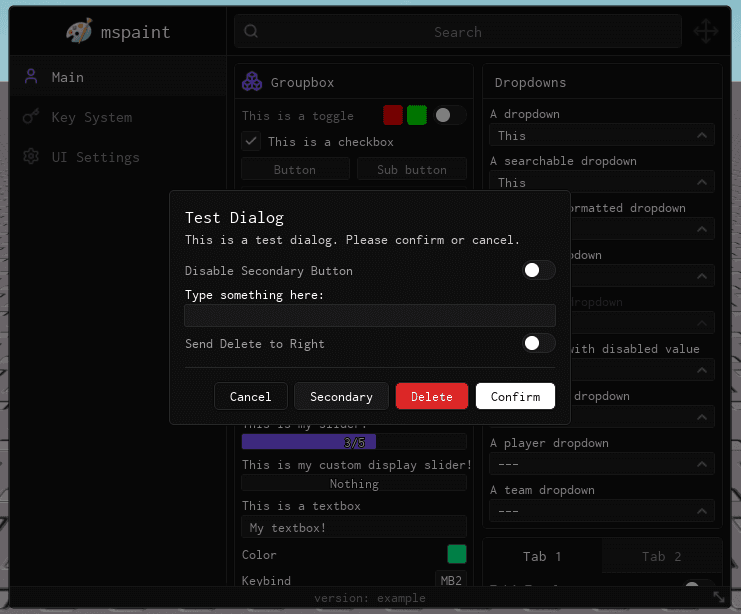
Dialogs overlay the user interface and blur out the background, demanding the user's attention.
Dialogs inherit methods from Groupboxes therefore you can call all standard Groupbox methods (AddToggle, AddInput, AddSlider, etc.) on the returned Dialog instance to build custom interactions directly into the Dialog.
local Dialog
Dialog = Window:AddDialog("DialogueIdx", {
    Title = "Test Dialog",
    Description = "This is a test dialog. Please confirm or cancel.",
    AutoDismiss = true,
    OutsideClickDismiss = true,
    FooterButtons = {
        Cancel = {
            Title = "Cancel",
            Variant = "Ghost",
            Order = 1,
            Callback = function()
                print("Cancelled the dialog.")
            end
        },
        Secondary = {
            Title = "Secondary",
            Variant = "Secondary",
            Order = 2,
            Callback = function()
                print("Secondary action.")
            end
        },
        Delete = {
            Title = "Delete",
            Variant = "Destructive",
            Order = 3,
            Callback = function()
                print("Deleted the asset.")
            end
        },
        Confirm = {
            Title = "Confirm",
            Variant = "Primary",
            WaitTime = 3, -- 3 seconds minimum wait
            Order = 4,
            Callback = function(self)
                print("Confirmed the dialog.")
            end
        }
    }
})

Dialog:AddToggle("DisableSecondary", {
    Text = "Disable Secondary Button",
    Default = false,
    Callback = function(value)
        Dialog:SetButtonDisabled("Secondary", value)
    end
})

Dialog:AddInput("InputTest", {
    Text = "Type something here:",
    Callback = function(value) print("Typed:", value) end
})

Dialog:AddToggle("SwapDeleteOrder", {
    Text = "Send Delete to Right",
    Default = false,
    Callback = function(value)
        Dialog:SetButtonOrder("Delete", value and 5 or 3)
    end
})
Window:AddDialog("EmptyDialogueIdx", {
    Title = "Empty Dialog",
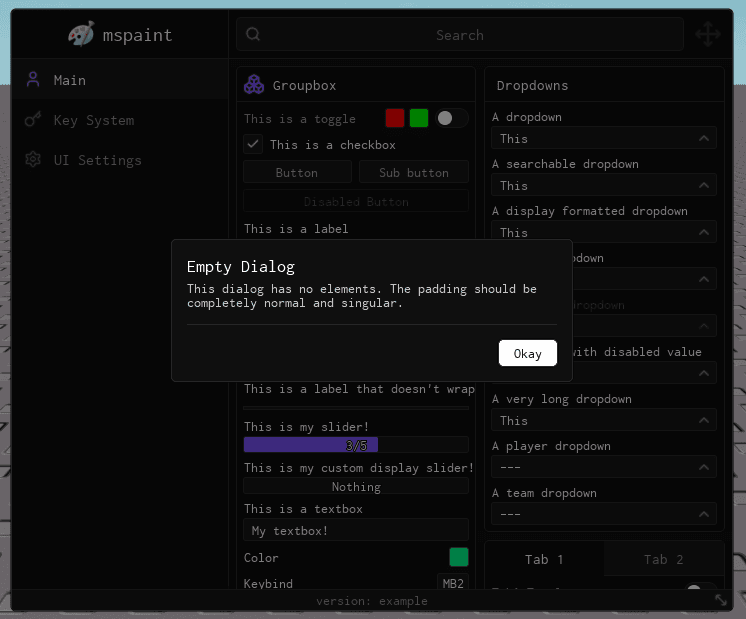
    Description = "This dialog has no elements. The padding should be completely normal and singular.",
    AutoDismiss = true,
    OutsideClickDismiss = true,
    FooterButtons = {
        Confirm = {
            Title = "Okay",
            Variant = "Primary",
            Callback = function() end
        }
    }
})
Prop
Type
Custom Button Example
To configure custom footer buttons, specify a dictionary mapped to their properties in FooterButtons. You can natively assign a WaitTime to any button, and Obsidian will render an animated progress bar preventing interaction until the timer expires.
Confirm = {
    Title = "Confirm",
    Variant = "Primary", -- Optional (Primary, Secondary, Destructive, Ghost)
    WaitTime = 3, -- 3 seconds minimum before the button can be clicked
    Order = 4,
    Callback = function(self)
        print("Confirmed the dialog.")
    end
}
Methods
Dialogs inherit all methods from Groupboxes. You may use AddToggle, AddInput, AddDropdown, and so forth directly on the Dialog instance itself. The methods below are unique to Dialogs.
SetTitle
Update the dialog title dynamically.
Dialog:SetTitle("New Title")| Arg Idx | Argument Description | Type | Default |
|---|---|---|---|
| 1 | New title of the dialog | string | nil |
SetDescription
Refresh the descriptive text dynamically.
Dialog:SetDescription("New Description")| Arg Idx | Argument Description | Type | Default |
|---|---|---|---|
| 1 | New description of the dialog | string | nil |
AddFooterButton
Programmatically inject a new footer button into the dialog.
Dialog:AddFooterButton("ExtraAction", {
    Title = "Do something else",
    Variant = "Secondary",
    Callback = function() end
})| Arg Idx | Argument Description | Type | Default |
|---|---|---|---|
| 1 | Dictionary Index Reference | string | nil |
| 2 | Dialog Button Configuration Table | DialogButtonInfo | nil |
RemoveFooterButton
Programmatically remove an existing footer button from the dialog.
Dialog:RemoveFooterButton("ExtraAction")| Arg Idx | Argument Description | Type | Default |
|---|---|---|---|
| 1 | Dictionary Index Reference | string | nil |
SetButtonDisabled
Change the disabled state of a specific footer button dynamically.
Dialog:SetButtonDisabled("Confirm", true)| Arg Idx | Argument Description | Type | Default |
|---|---|---|---|
| 1 | Dictionary Index Reference | string | nil |
| 2 | Whether the button should be disabled | boolean | nil |
SetButtonOrder
Change the display order index of a specific footer button dynamically.
Dialog:SetButtonOrder("Delete", 5)| Arg Idx | Argument Description | Type | Default |
|---|---|---|---|
| 1 | Dictionary Index Reference | string | nil |
| 2 | New Layout Order | number | nil |
Dismiss
Explicitly close and destroy the dialog and all its visual child elements.
Dialog:Dismiss()