
Notifications
Timed and persistent toast notifications for non-blocking feedback.
Notifications
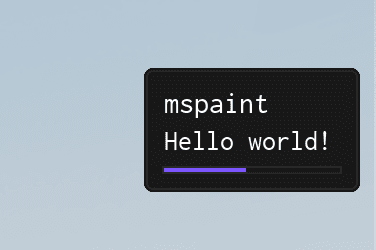
Use Library:Notify() for quick, non-blocking feedback. Notifications support:
- Simple timed popups.
- Persistent messages you can update or destroy.
- Progress indicators with step counters.
- Optional sounds or other custom behavior based on your own logic.
Creating a notification
Choose between positional arguments for quick calls or a configuration table for full control.
Regular parameters
Library:Notify("Hello world!", 4)| Arg Idx | Argument Description | Type | Default |
|---|---|---|---|
| 1 | Description of the notification | string | "nil" |
| 2 | Amount of time to show the notification for | number | instance | 4 |
| 3 | SoundId to play when the notification is shown | number | nil |
| 4 | Volume of the notification sound | number | 3 |
Table parameters
Pick an example that matches your use case:
Library:Notify({
    Title = "mspaint",
    Description = "Hello world!",
    Time = 4,
})Library:Notify({
Title = "Icon Notification",
Description = "This notification has a neat little icon beside the text.",
Icon = "info", -- Lucide icon Name
Time = 4,
})Library:Notify({
Title = "Big Icon Notification",
Description = "This notification is using the legacy 24x24 separated image layout.",
BigIcon = "rbxassetid://10204738596",
IconColor = Color3.new(0, 1, 0), -- Green
Time = 4,
})local Notification = Library:Notify({
Title = "mspaint",
Description = "Waiting for next match...",
Persist = true,
})
-- Wait for the player to start playing
game.Players.LocalPlayer:GetAttributeChangedSignal("Playing"):Wait()
-- Destroy the notification
Notification:Destroy()-- Create a persistent notification (this also works for non persistent notifications)
local Notification = Library:Notify({
Title = "mspaint",
Description = "Waiting for next match...",
Persist = true,
})
-- Wait for the player to start playing
game.Players.LocalPlayer:GetAttributeChangedSignal("Playing"):Wait()
-- Update the notification
Notification:ChangeTitle("mspaint - Match Starting")
Notification:ChangeDescription("Waiting for match to finish loading...")
-- Wait for the match to finish loading
workspace.Map:GetAttributeChangedSignal("MatchLoaded"):Wait()
-- Remove the notification
Notification:Destroy()-- Create a progress notification (steps = amount of steps)
local Notification = Library:Notify({
Title = "mspaint",
Description = "Loading...",
Steps = 10,
})
for i = 1, 10 do
-- Update the notification with the current step
Notification:ChangeStep(i)
task.wait(0.1)
end
Notification:Destroy()Prop
Type
Methods
ChangeTitle
Update the notification title without recreating it.
Notification:ChangeTitle("New Title")| Arg Idx | Argument Description | Type | Default |
|---|---|---|---|
| 1 | New title of the notification | string | nil |
ChangeDescription
Refresh the supporting text while keeping the notification open.
Notification:ChangeDescription("New Description")| Arg Idx | Argument Description | Type | Default |
|---|---|---|---|
| 1 | New description of the notification | string | nil |
ChangeStep
Advance or rewind the progress bar when using step-based notifications.
Notification:ChangeStep(5)| Arg Idx | Argument Description | Type | Default |
|---|---|---|---|
| 1 | New step of the progress notification | number | nil |
Destroy
Immediately dismiss the notification and free its resources.
Notification:Destroy()