
Keybind Menu
A floating overlay that displays all registered keybinds and their current states.
Keybind Menu
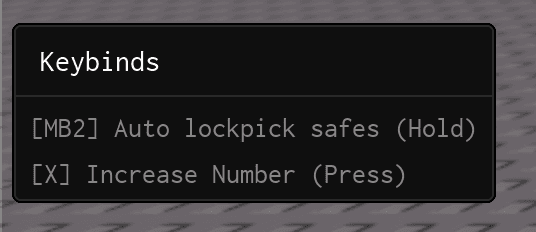
The Keybind Menu is a floating overlay that shows every registered KeyPicker alongside its current state. When a keybind is configured in Toggle mode the menu also renders tap-friendly buttons, giving mobile players parity with keyboard users.
Enabling the Keybind Menu
The Keybind Menu is hidden by default. To show it, set the frame's Visible property to true:
Library.KeybindFrame.Visible = trueLibrary.KeybindFrame is only created after Library:CreateWindow() has been called. Make sure to enable it after the window is set up.
Configuration
ShowToggleFrameInKeybinds
Controls whether toggle-mode keybinds display their on/off checkbox in the Keybind Menu. When true, each toggle-mode keybind gets a clickable checkbox so users can tap it directly from the menu.
Library.ShowToggleFrameInKeybinds = true| Value | Behaviour |
|---|---|
true | Show toggle checkboxes in the keybind menu (default) |
false | Hide the toggle checkboxes; only show the keybind name and key |